Who Pays for That Claude Code Session? Managing AI Coding Tool Budgets Across a Team
The Problem: Access Isn't Governance
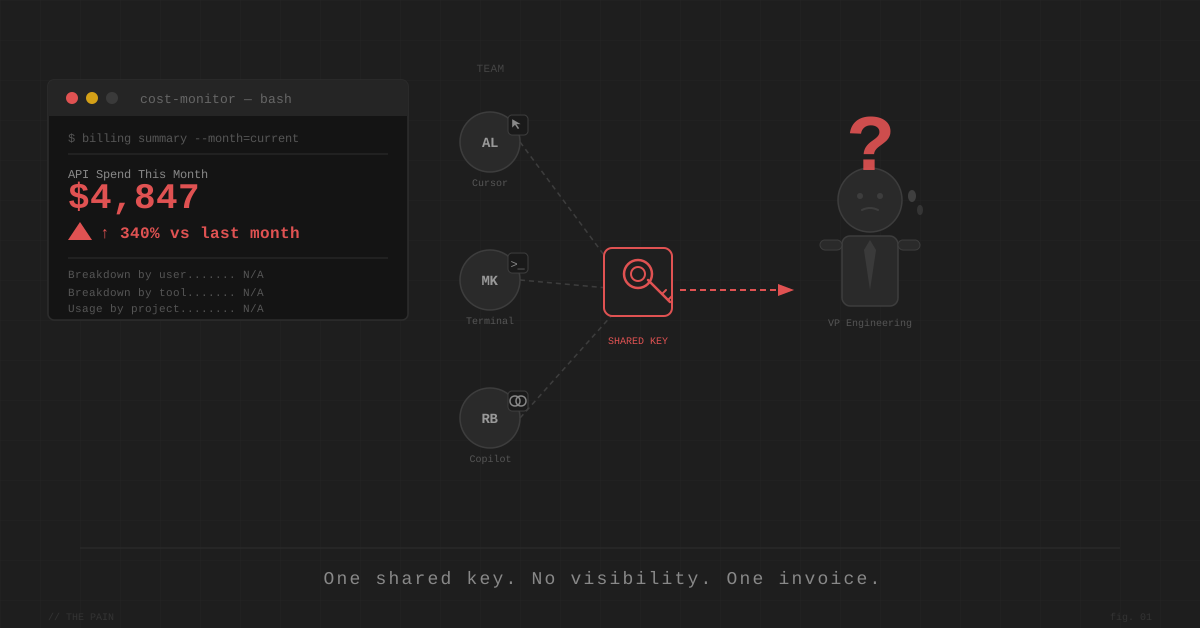
You gave everyone on the team their own access to agentic coding tools. Usage shot up. Then finance called.
Assume your starting point is the right one: a key or seat per developer. Seat-based tools like GitHub Copilot, Cursor, and Windsurf give per-person access by design. For API-key tools like Claude Code, the equivalent is issuing each developer their own key rather than sharing one.
If you’re still on a single shared key, fix that first. A shared key is an anti-pattern: you can’t attribute spend, you can’t cap anyone individually, and rotating it locks everyone out at once. Issue per-developer keys (or move to a proxy that mints them — see below) before anything else here applies.
But per-developer access only tells you who has the tool. It doesn’t give you governance. Even with everyone on their own key or seat, most teams hit the same wall when they want to:
- Set a monthly spend cap per developer and actually enforce it — not just track it after the fact
- See cost broken down by individual, tool, and workflow in one place
- Block a runaway agentic session before it burns through $500 overnight
- Govern multiple tools (Claude Code + Cursor + Copilot) under a single layer instead of three separate dashboards
Writing a policy (“please don’t exceed $X/month”) without enforcement is not budget management. It’s optimism.
Observation vs. Enforcement
There are two distinct things people mean when they say they want to manage AI tool budgets:
Observation — knowing what was spent, by whom, after the fact. Useful for reporting. Useless for preventing surprises.
Enforcement — hard limits that block requests when a budget is exhausted. The developer gets a clear error; the invoice doesn’t grow.
Most teams discover they needed enforcement only after the first runaway agentic session hits.
Daily or Monthly Budgets?
A monthly cap has a blind spot: a single bad night — a runaway loop, an agent stuck retrying — can burn a week’s budget before anyone wakes up. The damage is done by the time the monthly number looks alarming.
A daily cap is the tighter guardrail. It contains a runaway session to one day’s spend, resets every midnight, and turns “we blew the quarter’s budget” into “Tuesday looked weird.” For agentic coding tools specifically — where a misconfigured loop can spend continuously — daily windows are worth the slightly stricter limits.
The good news: most proxy tools support daily windows natively.
| Tool | Daily budget window? |
|---|---|
| LiteLLM Proxy | Yes — budget_duration: "1d" (also 1h, 7d, 30d) |
| Cloudflare AI Gateway | Yes — daily / weekly / monthly, fixed or rolling |
| OpenRouter | Yes — per-key daily / weekly / monthly resets |
| Portkey | Yes — custom 1–365 day reset (daily via API) |
| Anthropic Console | No — per-user caps are monthly only |
The practical setup: a daily cap as the runaway-session circuit breaker, plus a monthly cap as the overall budget. LiteLLM and Cloudflare both let you stack them.
The Solutions, By Setup
Claude Code only
If your team only uses Claude Code, the cleanest option requires no proxy at all. Anthropic added per-user spend caps to the Anthropic Console in April 2026:
- Per-user spend limits (monthly only — no daily option)
- User management via SCIM sync (Okta, Active Directory)
- Per-user usage dashboard for admins
Two catches: it only controls Claude usage, and the caps are monthly. If you want a daily guardrail, or anyone on your team also uses Cursor, Copilot, or Gemini CLI, you need a proxy layer instead.
Multiple tools (Claude Code + Cursor + Copilot)
This is where most teams are. Each tool has its own native admin controls — but those only govern that tool. You end up with three separate dashboards and no unified picture.
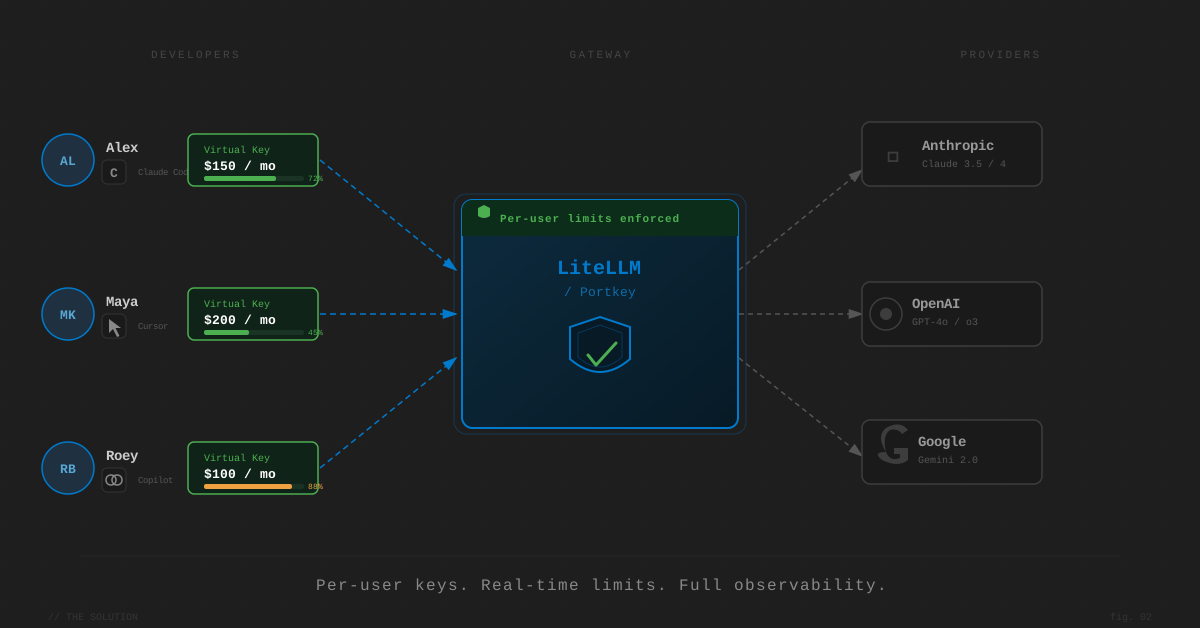
The solution is a proxy layer: a gateway that sits between your developers and the AI providers. All API calls route through the proxy; it tracks spend, enforces budgets per virtual key, and blocks requests when a limit is hit.
LiteLLM Proxy is the most widely used open-source option. Self-hosted, it supports 100+ providers — Claude Code, Cursor (via BYOK), and Gemini CLI can all route through the same instance. Each developer gets a virtual key with a dollar cap enforced in real time, on any window you want (budget_duration: "1d" for daily, "7d", "30d"). The dashboard shows per-user spend, per-model breakdowns, and request logs.
Portkey offers the same capability as a managed SaaS — no self-hosting burden. Per-key caps support custom reset intervals from 1 to 365 days (daily included, via the API). Budget enforcement requires the Enterprise plan (contact sales), but smaller teams can get observability on lower tiers.
Cloudflare AI Gateway launched spend limits in June 2026. No self-hosting, available on any paid Cloudflare account, with daily / weekly / monthly windows (fixed or rolling) and metadata-scoped limits (by user ID, team, or app). It’s the newest entrant and still lacks deep per-team RBAC, but it’s the lowest-friction option for straightforward per-key limits.
OpenRouter is a managed gateway whose spend limit lives on the API key, not the model — issue a key per developer and the cap holds no matter which provider the request routes to (Gemini, Claude Opus, GPT). Per-key limits support daily/weekly/monthly resets, model switching needs no code change, and Zero Data Retention is available as an org-level default. Traffic flows through OpenRouter’s infrastructure with a small markup.
Bifrost (by Maxim AI) is purpose-built for coding agent workloads with hierarchical budgets: org → team → virtual key → provider. Worth evaluating for larger orgs with complex structures — not yet on the site.
Just need visibility first
If your problem right now is “we have no idea where the money is going,” Helicone gives you per-request cost visibility and per-user breakdowns with minimal setup. It doesn’t enforce limits, but it’s a fast way to baseline your spend before committing to an architecture.
Note: Helicone was acquired by Mintlify in early 2026; its long-term roadmap is uncertain.
Tool Comparison: Pros & Cons for Budget Governance
How each option stacks up specifically for managing team AI coding budgets — not as a general gateway. Tool names link to our full review of each.
| Tool | Pros for this use case | Cons for this use case |
|---|---|---|
| LiteLLM Proxy | Open-source and free; enforced per-user caps with daily/weekly/monthly windows; 100+ providers through one gateway; data stays self-hosted | You run the infrastructure; advanced routing config has a learning curve |
| OpenRouter | Managed, no self-hosting; per-key cap holds across every model; daily/weekly/monthly resets; ZDR available by default | Traffic flows through their infra with a small markup; not ideal for strict compliance or very high volume |
| Portkey | Managed; per-key caps with custom 1–365 day resets; clean dashboard and alerts | Hard budget enforcement is Enterprise-only (contact sales); your traffic flows through their cloud |
| Cloudflare AI Gateway | Lowest setup effort; daily/weekly/monthly + rolling windows; free on any paid Cloudflare account; block or downgrade at the cap | Newest entrant; lacks deep per-team RBAC and virtual-key hierarchies |
| Helicone | Best-in-class cost visibility; one-line setup; great for baselining spend first | Observation only — no hard caps; roadmap uncertain post-Mintlify acquisition |
| Anthropic Console | Native to Claude Code, no proxy needed; per-user caps; SCIM user sync | Claude-only; monthly caps only (no daily); doesn’t see Cursor/Copilot |
How to Choose
| Your situation | Recommended path |
|---|---|
| Claude Code only, small team | Anthropic Console spend caps |
| Multiple tools, comfortable self-hosting | LiteLLM Proxy |
| Multiple tools, want managed SaaS | OpenRouter, Portkey (Enterprise), or Cloudflare AI Gateway |
| Large org, complex team hierarchy | Bifrost |
| Just need visibility first | Helicone |
→ Browse all AI gateways & model routers on AI Tool Review — the full category of tools that can meter and govern AI spend.
Doing It Manually (Without a Proxy)
Not ready to add a tool to your stack? You can get most of the way there with what the providers already give you — it just takes more discipline and won’t enforce hard caps. This is a reasonable starting point for small teams who want governance today without standing up infrastructure.
1. Issue a key (or seat) per developer. This is the one non-negotiable. Per-developer credentials are what make every other manual step possible — without them you can’t attribute a dollar to a person. Most providers let you create multiple API keys per organization at no cost.
2. Pull spend from the provider’s usage API on a schedule. Anthropic, OpenAI, and most providers expose a usage/cost endpoint. A small cron job (or even a weekly manual export) that hits the API per key and drops the numbers into a spreadsheet or a Slack message gives you the per-developer breakdown a proxy would show in a dashboard — just after the fact instead of in real time.
3. Set soft alerts instead of hard blocks. You can’t make the provider’s raw API stop at a dollar amount the way a proxy can, but you can alert. Anthropic’s Console supports spend-notification thresholds at the org and workspace level; wire those to email or Slack so someone sees “80% of budget” before it’s “200%.”
4. Review weekly and act. The manual approach lives or dies on the review cadence. A standing 10-minute weekly check of the per-developer numbers catches the runaway session that an enforced daily cap would have stopped automatically.
The honest trade-off: manual tracking is observation, not enforcement. It tells you who overspent — it doesn’t stop them mid-session. A runaway agent at 2am still runs until morning. That’s exactly the gap a proxy closes, which is why most teams graduate to one (LiteLLM is the common first step) once the manual process proves the need. Think of the manual path as the way to learn your numbers before you automate them.
Policy vs. Enforcement
Some teams ask whether a written policy is enough. The honest answer: it depends on your team culture, but enforcement is always better.
A policy fails silently. An enforced limit fails loudly — the developer gets an error, asks their manager, and that conversation happens proactively rather than when the invoice arrives.
The pattern that works:
- Set a daily cap as the circuit breaker (best practice). A daily per-developer limit contains a runaway agentic session to one day’s spend instead of one month’s — the single most effective guardrail for agentic coding tools. Use a proxy that supports daily windows (LiteLLM, Cloudflare, OpenRouter, Portkey).
- Layer a monthly cap on top for the overall budget. Daily stops the disaster; monthly governs the trend.
- Keep individual limits generous so developers aren’t blocked on legitimate work, with a tighter team limit above them.
- Review per-developer breakdowns regularly. When someone consistently hits their limit, that’s a coaching conversation about agentic workflow efficiency — not a cost-cutting exercise.
On shared vs. per-user budgets: teams that rotate tool access on a monthly schedule (who gets Claude Code this month vs. next) are optimizing for the wrong thing. Tool-switching overhead is real and disrupts flow. Per-user limits on always-on access is almost always better.