Is Your Claude Code Session Writing on the Wrong Branch?
~/.claude/CLAUDE.md and it happens automatically, in every project. Want to know how? Just scroll down…
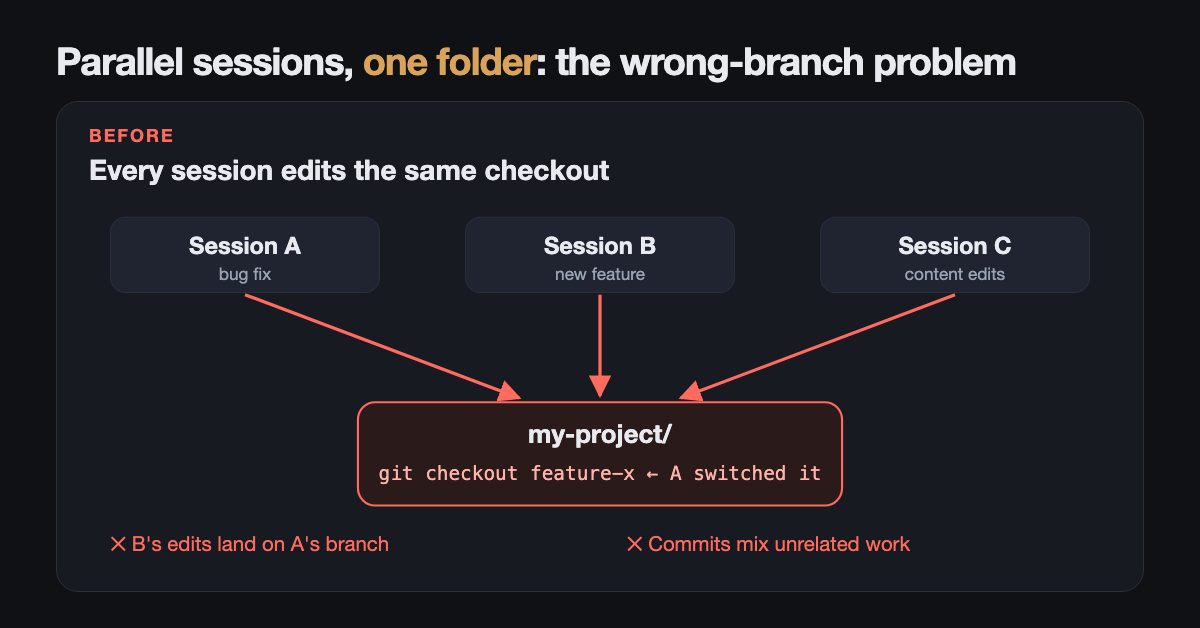
1st Stage: Chaos
I run several Claude Code sessions at once in VS Code. One fixes a bug, one builds a feature, one edits content for this site. It felt like a superpower… until it didn’t.
Every once in a while, a session committed to the wrong branch. Then it happened again. Commits mixed unrelated work, and I spent more time untangling git than shipping. I asked myself:
- Why is session B writing on session A’s branch?
- Which commit belongs to which task?
- How do I run sessions in parallel without babysitting them?
Turns out the answer was simple: a git repository has one working folder and one checked-out branch. When session A ran git checkout feature-x, session B didn’t know. It just kept writing, now on A’s branch.
2nd Stage: My Own Script
The fix is a git worktree: a separate folder for the same repository, with its own files and its own branch, sharing the same history. Think of it as giving every session its own desk, in the same office.
So I built a script. A startup hook asked each new session to name its worktree, then created it with its own branch and its own dev-server port. It worked! But it was one more piece of plumbing to maintain, debug, and explain to every new project.
3rd Stage: Clarity, Built In
Now Claude Code does it natively, with a built-in tool called EnterWorktree. No script, no hook, no maintenance.
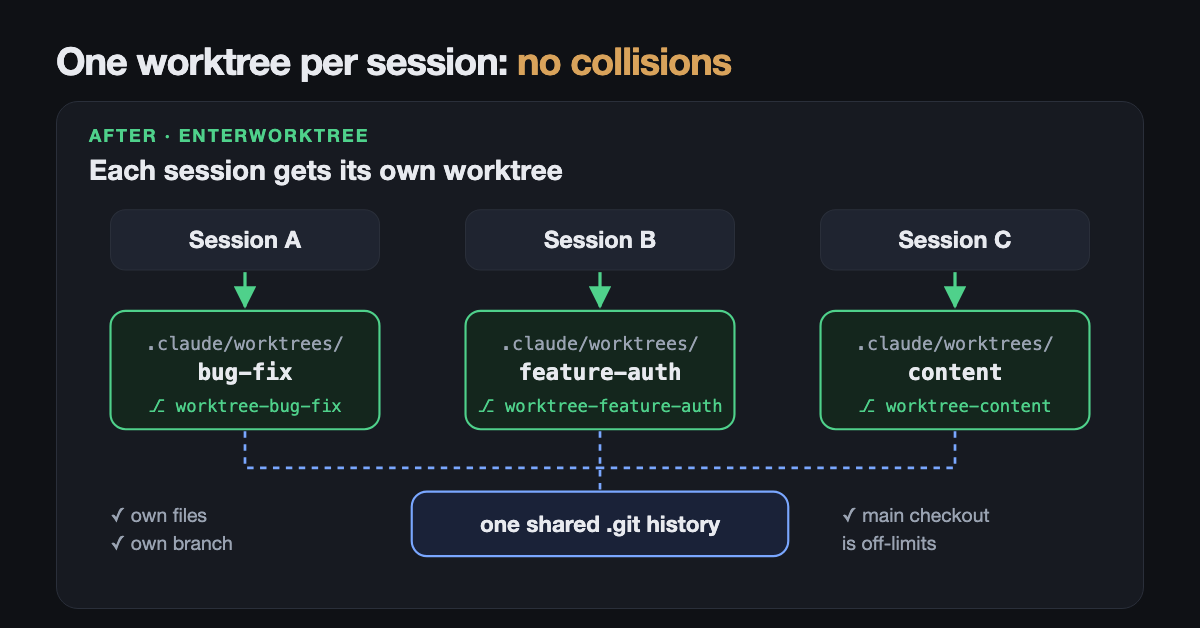 Each session gets its own folder and branch. They share history, not files.
Fewer collisions. More focus. Cleaner commits.
How to Do It Yourself
Step 1: Just ask Claude
The Challenge: you want an isolated session, right now (for example in the VS Code extension).
The Solution: just tell it:
work in a worktree
Claude creates the worktree with its native EnterWorktree tool and moves the session into it.
Need to jump to another task? Once in a worktree, Claude can switch directly to another one under .claude/worktrees/ by calling EnterWorktree with the target path:
switch to the feature-auth worktree
The previous worktree stays on disk, untouched, so you can come back to it later. (Moving to a folder outside .claude/worktrees/ asks for your approval first.)
Step 2: Make it automatic, everywhere
The Challenge: you will forget. I did.
The Solution: Claude only enters a worktree when you, or your instructions, ask for it. So put the instruction in your global ~/.claude/CLAUDE.md, which loads in every project:
Before touching any file in any git repo, in any project, call EnterWorktree first.
That’s it. One line (yes, really!!!) and every session isolates itself before its first edit.
Tips From the Trenches
- Ignore the folder. Add
.claude/worktrees/to.gitignore, so worktrees don’t show up as untracked files in your main checkout. - Bring your
.env. A worktree is a fresh checkout, so gitignored files aren’t there. List them in a.worktreeincludefile at the repo root (same syntax as.gitignore), and Claude copies them into every new worktree. - Install dependencies. Each worktree needs its own
npm install(or equivalent). Ask Claude to do it first. - Pick the base branch. New worktrees branch from your remote’s default branch (usually
origin/main). To branch from your current local work instead, add this to your settings:
{ "worktree": { "baseRef": "head" } }
The Results
- 🔧 Guard rails: while a session is in a worktree, Claude Code blocks edits and git commands that target the main checkout. Subagents follow the same rules.
- 🧹 Clean exits: a worktree with no changes is cleaned up when you exit (named sessions ask first). One with work in it asks whether to keep or remove it, and prints a
claude --worktree <name> --resumecommand for later. - 🤖 Isolated subagents: ask Claude to “use worktrees for your agents”, or add
isolation: worktreeto a custom subagent, and each agent gets its own temporary worktree. - 🔀 Start from a PR:
claude --worktree "#1234"fetches that pull request and opens a worktree on it. - 😊 No more wrong-branch commits, and one less script for me to maintain.
Final Thought
If you run more than one AI coding session at a time, don’t wait for the first wrong-branch commit. Add the line to your CLAUDE.md today. And before you build your own tooling like I did, check if it’s already built in : )
Let’s connect: how many sessions do you run in parallel? Did you solve this differently? A better way? Please share it in the comments, I would love to learn from you.
Related Resources
- Official worktree docs: cleanup rules,
.worktreeincludedetails, and non-git version control