Get More Out of Your Weekly Claude Quota: 3 Context Habits
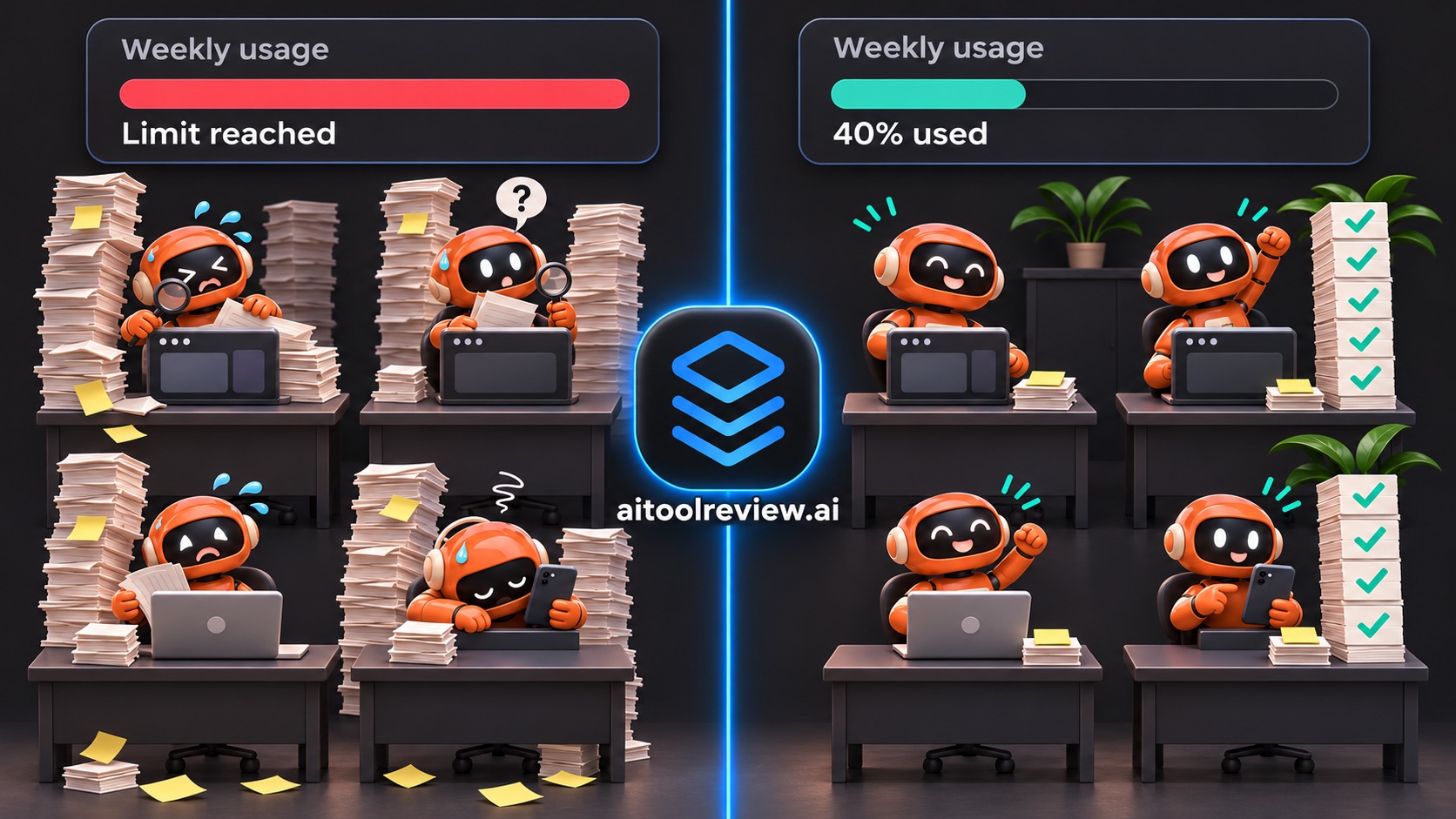
What You Get
- More tasks from the same weekly quota. On a Pro or Max plan, every message draws on your limit, cached or not. Less context per message means more messages per week. (Paying per token on the API? Then it’s a lower bill.)
- Sharper answers late in the session. The summary keeps your plan and drops the noise, so Claude stops forgetting what you said an hour ago.
- Nothing to install. Two commands and one rule.
- Faster results, not faster messages. The big win is finishing tasks sooner, not each message answering faster:
- Fewer redo loops. This is the big one. Fewer “you forgot what I said” moments, and fewer turns spent fixing them.
- No waiting for a reset. When your limit lasts the day, you don’t lose hours waiting for it to come back.
- A warm cache starts sooner. Anthropic says caching improves time to first token on long prompts. One of the habits keeps the cache warm.
- The trade-off: each compact pauses while Claude writes the summary, and that summary reads the full context once. Compacting more often means more short pauses. For me, it’s worth it. (I didn’t benchmark per-message latency, so I won’t give you a number.)
How much you gain depends on how big your sessions get today. If you already stay under 150K, expect a small change. If you often run past 500K, expect a big one.
This guide is focused on Claude Code, so the commands are Claude’s. But the principles work with any LLM: ChatGPT, Codex, Gemini and the rest all re-send the conversation, and all lose recall as it grows. Using another tool? Jump here.
The Problem: Limits by Noon
I love the 1M context window in Claude Code. No more “conversation too long”, one session can hold a whole feature. So I let my sessions run… and run.
Then I hit my usage limit before lunch. Again. And late in those long sessions, Claude started forgetting things I told it an hour earlier. I asked myself:
- Why does the same kind of work cost more every day?
- Why does a session get dumber the longer it runs?
- Is the big window the problem, or how I use it?
When I audited my usage, the answer jumped out: 49% of it came from messages sent with more than 150K tokens of context. Not from hard tasks. From long sessions I never cleaned up.
Why Long Sessions Cost More
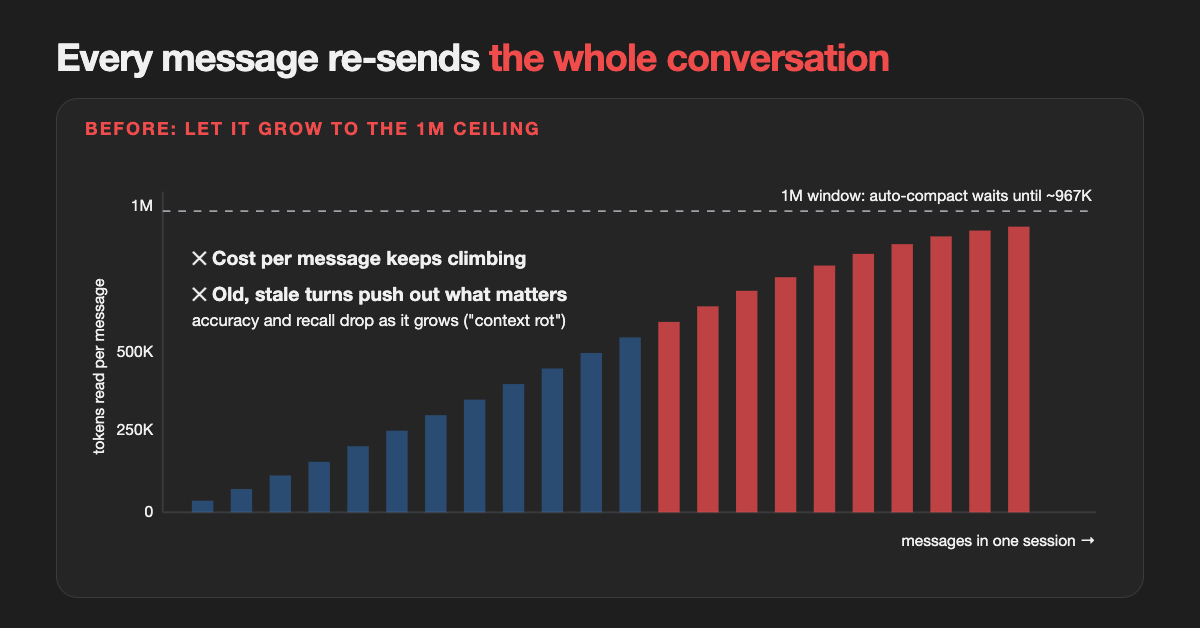 Every message re-reads everything before it. Let the session grow, and every message costs more and remembers less.
Every message re-sends everything
Turns out Claude Code sends the entire conversation with every message: your instructions, every file it read, every tool output, every reply. Prompt caching makes the repeated part cheaper, but cached reads still count against your plan. So a session at 750K pays about 3x per message what a 250K session pays, for the same question.
Bigger context, worse memory
It’s not just cost. Anthropic’s own docs say it plainly: as token count grows, accuracy and recall degrade, a phenomenon called context rot. The stale exploration from an hour ago competes with what matters now.
The window only cleans up at the very top
On models with a native 1M window, Claude Code auto-compacts at about 967K tokens. So by default, a session can grow almost to the ceiling before anything trims it. The window is a ceiling. I was treating it like a target.
The Fix: Three Habits
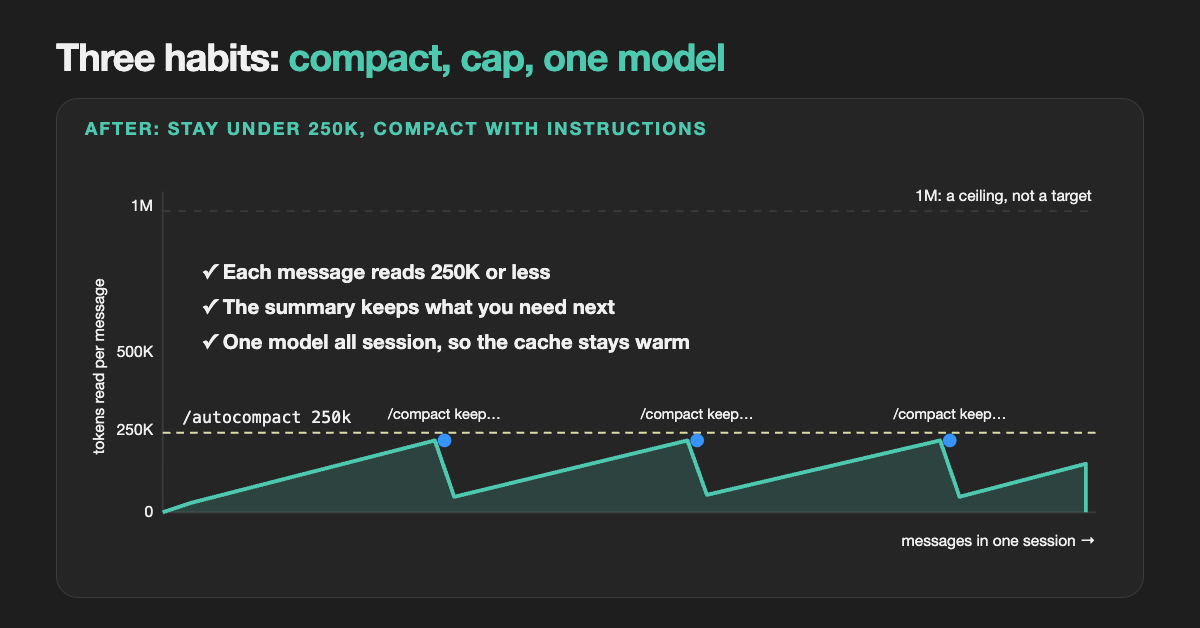 After: the session never goes past 250K, and each compact keeps exactly what the next step needs.
Habit 1: /compact with instructions
The Challenge: a plain /compact summarizes everything. It can’t know what you need next, so it may drop the one detail you care about (the failing test name, the plan you agreed on).
The Solution: tell it what to keep. /compact takes free text:
/compact keep the failing test names, the files we changed, and the next 3 steps. Drop the exploration.
Do it at natural breaks: after a research phase, before you start building, after a fix lands. If you always want the same focus, add a section to your CLAUDE.md and every compact (manual or automatic) follows it:
# Compact instructions

When you are using compact, please focus on test output, code changes, and the next steps.
And when you switch to an unrelated task, skip the summary: /clear starts fresh, for free.
Habit 2: Stay under 250K
Why it matters: without a cap, nothing trims the session until about 967K. Until then, every message pays for everything before it.
The Challenge: you will forget to compact. I did, every time.
The Solution: let Claude Code compact earlier, by itself. One command:
/autocompact 250k
It is saved to your user settings for the current model, so it sticks across sessions. Prefer a file? Put it in ~/.claude/settings.json (applies to every model):
{ "autoCompactWindow": 250000 }
Why 250K? It is my rule, not an official number. Anthropic recommends habits, not a size. For my work, 250K holds a full feature with room to spare, and it keeps every message at a quarter of the ceiling. Pick yours with /context, which shows what is filling the window right now.
Habit 3: Don't switch models mid-session
Why it matters: Claude keeps a cheap, ready copy of your conversation (the cache), but only for the model you’re on. Switch models, and the new one has no copy. So the next message pays close to full price to read your whole conversation again.
The Challenge: it’s tempting to start on a cheap model, then /model to a stronger one for the hard part (or the other way round).
The Solution: pick the model at the start, and keep it. How big is the hit? On Opus 5.5 or Sonnet 5.5, a cached read is billed at 0.05x the input price. Building the new cache costs 1.25x or more. So the first message after a switch costs about 25 times a normal one (yes, you read that right!!!). At 250K, that’s survivable. At 800K, it hurts.
Need a different model anyway? Three cheaper ways to get there:
- Hand over to a new session. Ask Claude to write a short handover file: the goal, what’s done, the files that matter, the next steps. Then start a new session on the right model (
claude --model opus, or/modelbefore your first message) and point it at that file. The new session starts at a few thousand tokens, not 800K. - Send the job to a subagent. A subagent runs on its own model with its own small context, and only its answer comes back to your session. (More in Stop Burning Tokens on Subagents.)
- Compact first, then switch. If you must switch in place, run
/compactfirst. The new model then re-reads a short summary, not the whole history.
Not on Claude? Same Habits
This guide is about Claude Code, but the three habits travel. Here is what each one looks like elsewhere (checked against each vendor’s docs, November 2026):
| Habit | Codex CLI | Gemini CLI | ChatGPT app |
|---|---|---|---|
| 1. Compact | /compact |
/compress |
No command. Start a new chat and paste a short summary. |
| 2. Cap the context | model_auto_compact_token_limit = 250000 in ~/.codex/config.toml |
{"model": {"compressionThreshold": 0.25}} in settings.json (a share of the window; restart after) |
Not available |
| 3. One model per session | Yes | Yes | Yes |
A few differences worth knowing:
- No instructions. Neither Codex’s
/compactnor Gemini’s/compressdocuments a way to say what to keep. So compact at natural breaks, right after a phase ends, when the summary has less to lose. - Gemini has a price step. On the Gemini API, Pro models charge more per token above 200K input tokens. Staying under 200K there saves twice.
- OpenAI caches per model too. Its docs say a different model can mean a different cache, so a switch misses it.
- ChatGPT counts messages, not tokens. Plus limits are a number of messages per few hours, so a small context won’t stretch your quota there. It still gets you better answers in long chats.
Tools That Help
The habits cost nothing. These tools make them easier, mostly by keeping junk out of the context in the first place. All have pages on this site; the numbers are each maker’s own claims.
Tried one of these? Leave a review on its page (look for Write a review), so the next person knows what really works. Found a tool that belongs on this list? Suggest it with + Suggest a tool at the top of any page. Both help everyone pick faster.
Make the agent write less
Output stays in the context too, and gets re-read with every message.
- Ponytail makes the agent reach for what already exists (built-ins, platform features) before writing new code. Smaller diffs, less to re-read (80 to 94% less code output, per its maker).
- Caveman makes the agent answer in short, plain sentences, with every technical fact kept (about 75% fewer tokens, per its maker).
See where your context goes
- Token Optimizer audits a Claude Code (or Codex) setup and shows what is filling the window and wasting tokens. It also keeps your work safe through compactions, which pairs well with Habit 1.
- Claude Dashboard is a local dashboard of your Claude Code usage: burn rate, sessions, models. Use it to see the difference before and after you adopt the habits.
Put less into the context
Every file read and every command output lands in the context and gets re-sent with every message after it. These tools shrink it before it gets there, so you hit the 250K cap less often:
- Context Mode sandboxes tool output so only the useful part enters the conversation (up to 98% less, per its maker).
- RTK trims the output of common dev commands like test runs and git (60 to 90% less).
- Headroom compresses everything an agent reads: files, logs, tool output (60 to 95% less).
Ask a map, don't read every file
Graphify turns your code and docs into a knowledge graph your agent can query. Why does that help? Most context is the agent reading files to understand how things connect. With a graph, it asks “what calls this function?” and gets a short answer, instead of opening ten files and keeping all of them in the context for the rest of the session. Its maker claims 71x fewer tokens than reading the raw files.
Browse more in AI Cost Reduction, including Token Optimization and Usage Analytics, and the LLM Skills subcategory.
Final Thought
The 1M window is a great safety net. Use it like one. Run /context in your current session right now. I bet it’s bigger than you think : )
Less context. More tasks. Better answers.
Related Resources
- Stop Burning Tokens on Subagents: route each subagent to the cheapest model that can do the job
- Managing AI Coding Tool Budgets: a broader look at keeping AI-assisted development affordable
- Official cost guide: why usage climbs in a long session, and more ways to cut it
Sources
- Claude Code Docs - Manage costs effectively
- Claude Code Docs - Model configuration (auto-compact window)
- Claude Code Docs - Prompt caching (switching models)
- Claude Docs - Context windows (context rot)
- Claude Docs - Pricing
- Codex - Configuration reference
- Gemini CLI - Commands
- Gemini CLI - Configuration
- OpenAI - Prompt caching
- Gemini API - Pricing